How to Check Plate Number in LTO Online (2026 Guide)


 October 19, 2026 6:56 am
I’ve lost count of how many times friends have texted me asking the same question: “paano malalaman kung ready na yung plate ko?” So here’s everything I’ve learned from actually going through the process myself, plus what the official channels say.
Let’s start with the basics. Motorists across the Philippines now have more than one way to confirm where their vehicle plate stands in the release pipeline:
- LTO Portal: the government’s main digital gateway for plate status
- LTO-NCR Plate Inquiry: a dedicated page for vehicles registered within the National Capital Region
- SMS lookup: works from a basic phone, no internet needed
- In-person visit: the old-fashioned route through your LTO district office
Whichever path you take, the goal is the same: getting a clear read on your plate number status without wasting a whole afternoon in a queue. Sites like ltotrackers.com have popped up to make navigating these options a little less confusing, especially for first-time vehicle owners who don’t know where to even begin looking.
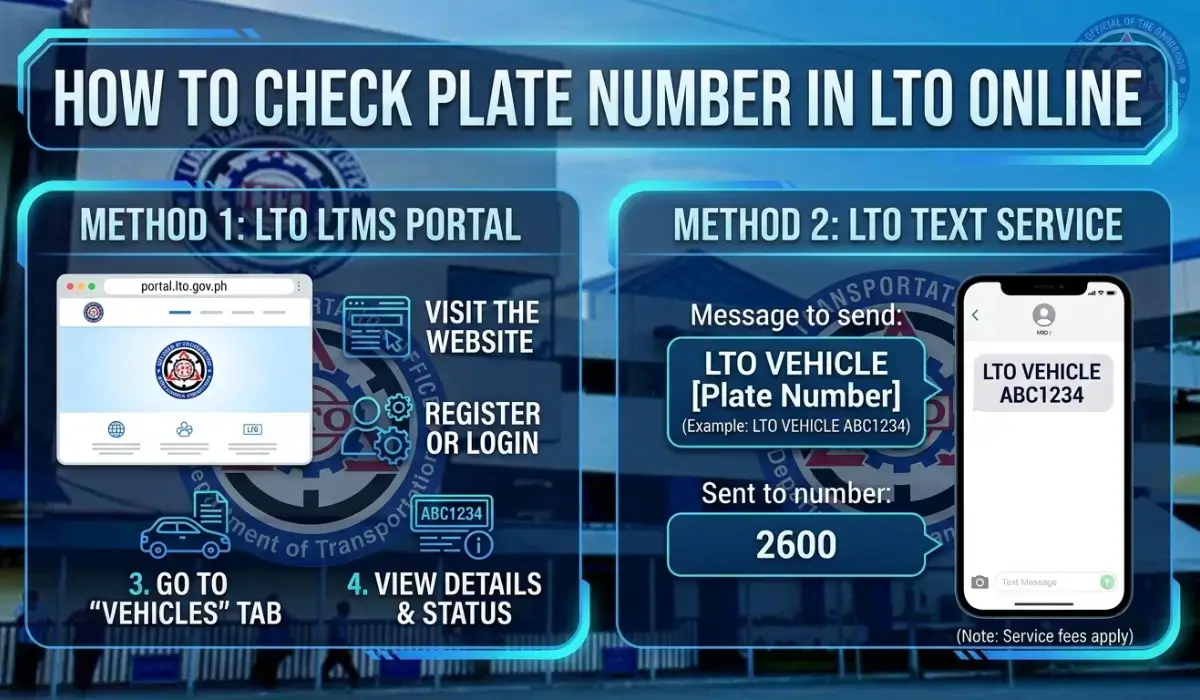
Online via LTO Portal (LTMS)
This is where most people end up sooner or later, and honestly, once you’ve done it once, it’s not bad at all.
- Log in to your LTMS account: if you’ve never registered before, create one first, which takes maybe five minutes.
- Head to the vehicle status section (sometimes labeled the plate status section, depending on how the interface is arranged that week).
- Enter either your plate number or your 15-digit MV File Number, found on your Certificate of Registration (CR).
- On the homepage, some portals show a dedicated Check Plate Number field — you can also enter a conduction sticker number here if your actual plate hasn’t been issued yet.
- Hit Search or Submit, whichever button is on your screen, and wait a beat.
What comes back will tell you the following:
| Field | What It Shows |
|---|---|
| Plate Status | Released, For Processing, or Available for Pickup |
| Plate Type | Private Vehicle, Motorcycle, or Public Utility Vehicle |
| Region / LTO Office | The specific office currently handling your record |
This data is pulled straight from the official LTO database, so accuracy generally isn’t the issue; delays usually are. If everything checks out as Released, your next stop is either your assigned LTO District Office or, if you bought through a dealership, the car dealership itself. Need to keep your vehicle registration up to date? See our LTO Registration Renewal guide.
A heads-up for 2026 specifically: the portal has had noticeable uptime issues this year. If you get an error or the page keeps timing out, you’re not the only one — it’s been a recurring complaint. Switching to the SMS method below, or trying again during off-peak hours (early weekday mornings tend to be lighter), usually gets you past it.
Via SMS (Alternative)
No internet? No problem, really. This is the method my uncle in the province swears by since he barely uses data on his phone.
- Open your text message app.
- Type LTO VEHICLE followed by your plate number — e.g.,
LTO VEHICLE ABC1234. - Send it to 2600. It’s a flat ₱2.50 charge, and this gets deducted the moment the message sends — whether or not you get a reply back, so double-check your plate number before hitting send.
- Keep in mind this only works Monday to Friday, 8:00 AM to 5:00 PM. Outside those hours, or on weekends, you won’t get a response.
- Coverage is strongest for private vehicles. Motorcycles and public utility vehicles aren’t consistently guaranteed through this channel, so the online portal or an in-person visit is more reliable for those.
The reply usually comes back within a minute or two and packs in more than you’d expect:
- Vehicle make and model
- Year of registration
- Color and type
- Last renewal date
- Plate number status
- Any pending violations or apprehension records tied to the vehicle
You can also review your vehicle’s records with the LTO Violation Checker.
That last bit alone makes it worth running even if you already know your plate is sitting fine.
In Person
Sometimes the digital methods just don’t cut it, or maybe you’re the type who trusts a face-to-face confirmation more. If that’s you:
- Head to your nearest LTO District Office ideally the specific office where the vehicle was originally registered, since records aren’t always instantly synced across branches.
- Bring your Official Receipt (OR) and Certificate of Registration (CR) in physical form.
- Bring a valid government-issued ID for verification.
It’s slower, no question, but there’s something reassuring about watching someone pull up your record on their end while you wait.
Why You Should Regularly Check Your Plate Number
Here’s a habit I wish I’d picked up sooner: checking plate status shouldn’t be a one-time thing reserved only for new car owners fresh off a dealership floor. It’s genuinely a smart habit for any driver across the Philippines, new or seasoned. Regular verification does a few things for you:
- Confirms whether your official plate is actually available for pickup
- Keeps you informed on whether your vehicle registration remains valid
- Helps you sidestep fines tied to unregistered vehicles that somehow slipped through the cracks
- Reveals pending cases on a second-hand vehicle before you hand over any money
Using official tools, along with guide resources like ltotrackers.com or the LTO SMS system directly, gives you a way to confirm that the vehicle information on record is legitimate and actually updated, not just what the seller claims.
Expert Tips for Accurate Results
A handful of small mistakes cause most of the failed lookups I’ve seen:
- Double-check the spelling and formatting of your plate number before submitting a single misplaced character throws off the whole search.
- If you’re still waiting on a physical plate, use your conduction number instead; searching with a plate that hasn’t been assigned yet just returns an error every time.
- If you do hit an error message, don’t panic and assume something’s wrong on your end try again a little later, since the system does go down for maintenance more often than people expect, especially during peak renewal seasons.
- For dealership-issued vehicles, if your status keeps showing For Processing longer than it should, coordinate directly with your dealer rather than repeatedly refreshing the portal — they often have visibility you don’t.
- Records aren’t always updated in real time batches typically sync every few days. If a fresh registration shows nothing yet, give it three to seven days before assuming there’s an actual problem.
- Plate checking itself is free. The only cost involved is the standard SMS fee nobody should be asking you to pay anything beyond that just to check a status.